
The Best Obsidian Plugins for 2026
Discover 75+ awesome Obsidian plugins, including Dataview, Tasks, Templater, and more. Curated by a PKM expert with 1,000+ users using my Obsidian Starter Kit


In this article, I'll list my favorite plugins for Obsidian. The best ones are included in my Obsidian Starter Kit:
 Knowledge Forge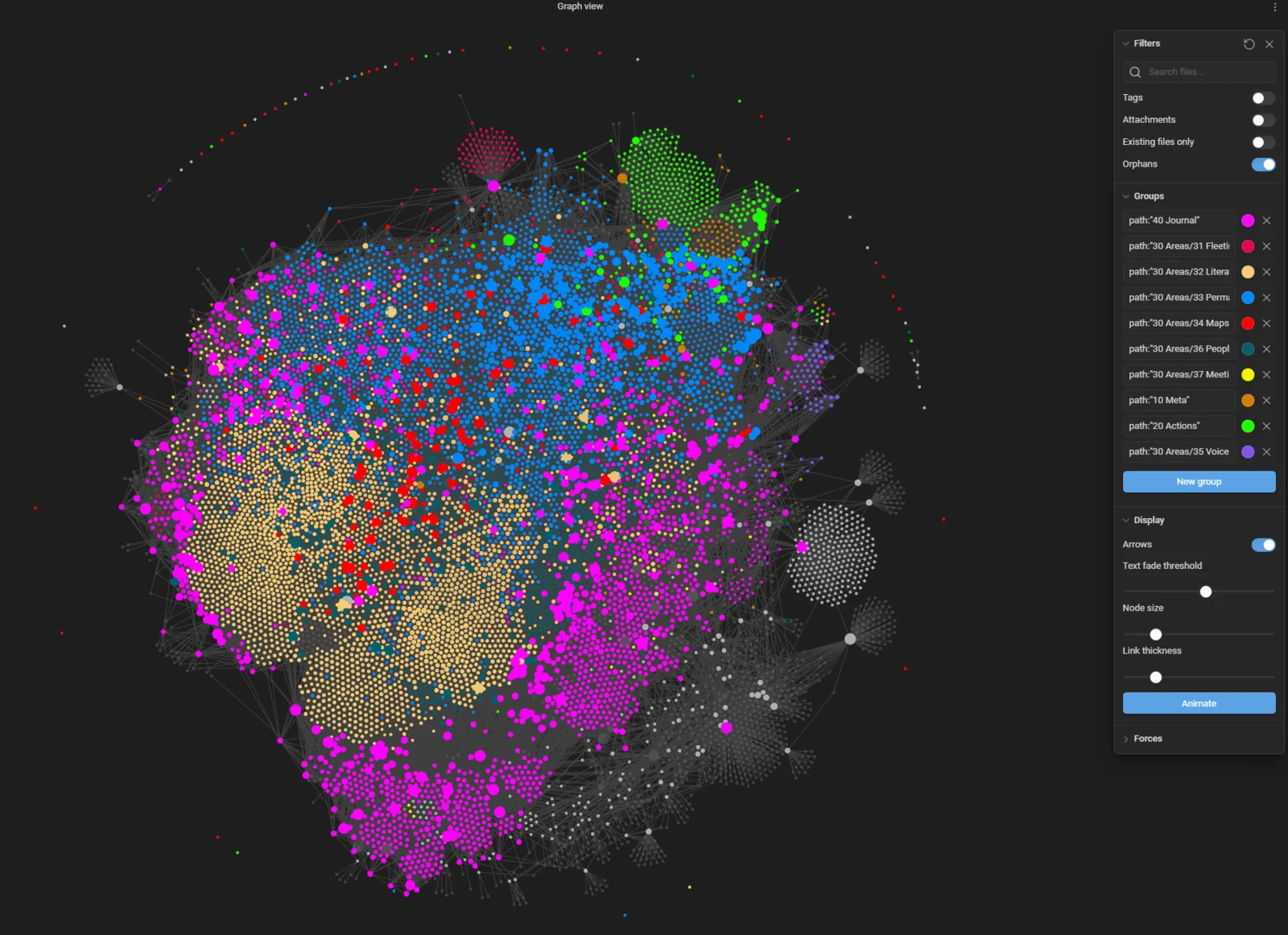
Introduction
Obsidian has a really large community and a huge library of community plugins (2700+ at the time I'm updating this).
Those plugins really add a lot of value to Obsidian and make for a much better user experience. Exploring those can be daunting. Let me spare you some time and introduce you to the very best plugins out there!
A word of warning though: you don't need plugins to get started. Those improve and empower existing workflows, but none are actually mandatory. If you're just getting started, keep things simple. You can add some plugins over time, but don't waste your time in the beginning, and instead focus on what matters: taking and making notes!
And when you get started, do focus on Obsidian Core Plugins
 Sebastien Dubois
 Knowledge Forge
Explore Obsidian
Before you even think about plugins, do make sure you first learn about the core features of Obsidian.
Here's a free workshop I've recorded:
How to find Obsidian plugins
First of all, keep in mind that this list is opinionated. There are many many more plugins out there. So let me first tell you where you can find additional ones.
There are various ways to discover valuable Obsidian plugins. First of all, you can use the official community plugins list:


Second, you can use the Obsidian Plugin Stats website to explore popular plugins, search by tags, etc:

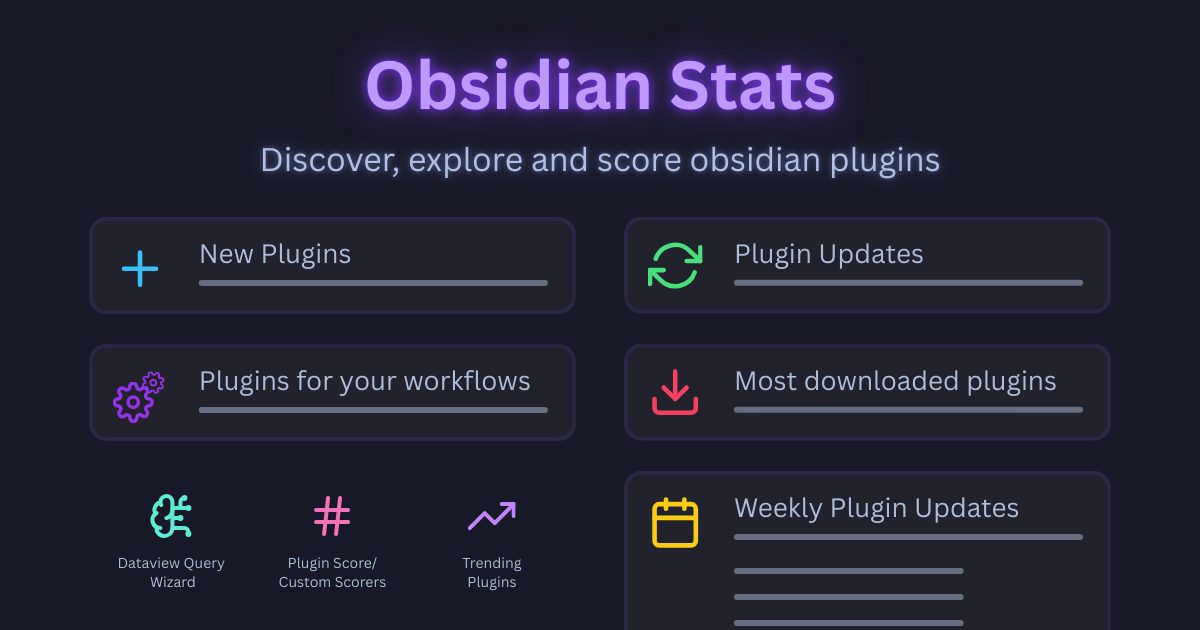
If you're a geek like me, you can keep an eye on the official plugins list, which is defined in this JSON file: https://github.com/obsidianmd/obsidian-releases/blob/master/community-plugins.json
And if you're a nerd like me, you can also ask AI to list all the recent plugins by simply pointing it to the link above.
You can even have more fun and analyze the raw plugin stats to discover popular/trending plugins: https://github.com/obsidianmd/obsidian-releases/blob/master/community-plugin-stats.json
TL;DR
Here are my 15 favorite plugins:
And here are the best utility plugins I recommend:
And here's the full list of plugins covered in this article:
Built-in Obsidian plugins
Obsidian comes out of the box with a set of "core" plugins that are disabled by default. You can enable/disable those through the options, under "Core plugins". Many of those are super useful.
Here are the core plugins I strongly recommend using:
Journaling & Life Tracking
Periodic notes
Using the periodic notes plugin, you can easily create periodic notes (i.e., daily, weekly, monthly, quarterly and yearly notes).
You can associate a specific template with each periodicity (e.g. a template for daily notes, another for weekly notes, etc). This plugin is also well integrated with the calendar plugin above. When you click on a date in the calendar, it creates the corresponding daily note.
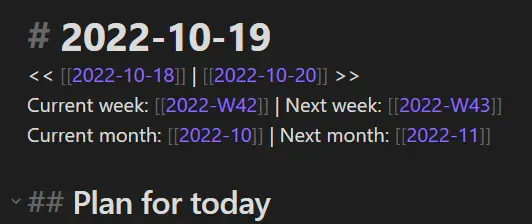
With this plugin, journaling is much easier to do on a regular basis, and so are weekly, monthly, quarterly and yearly periodic reviews
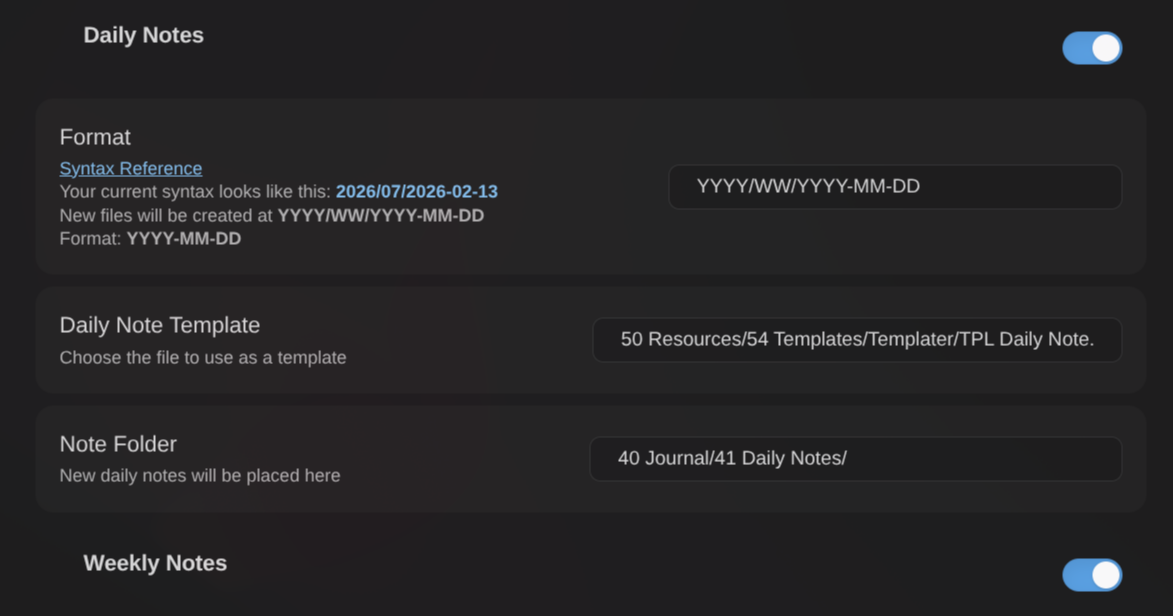
Details: Periodic notes plugin for Obsidian
Journal Bases
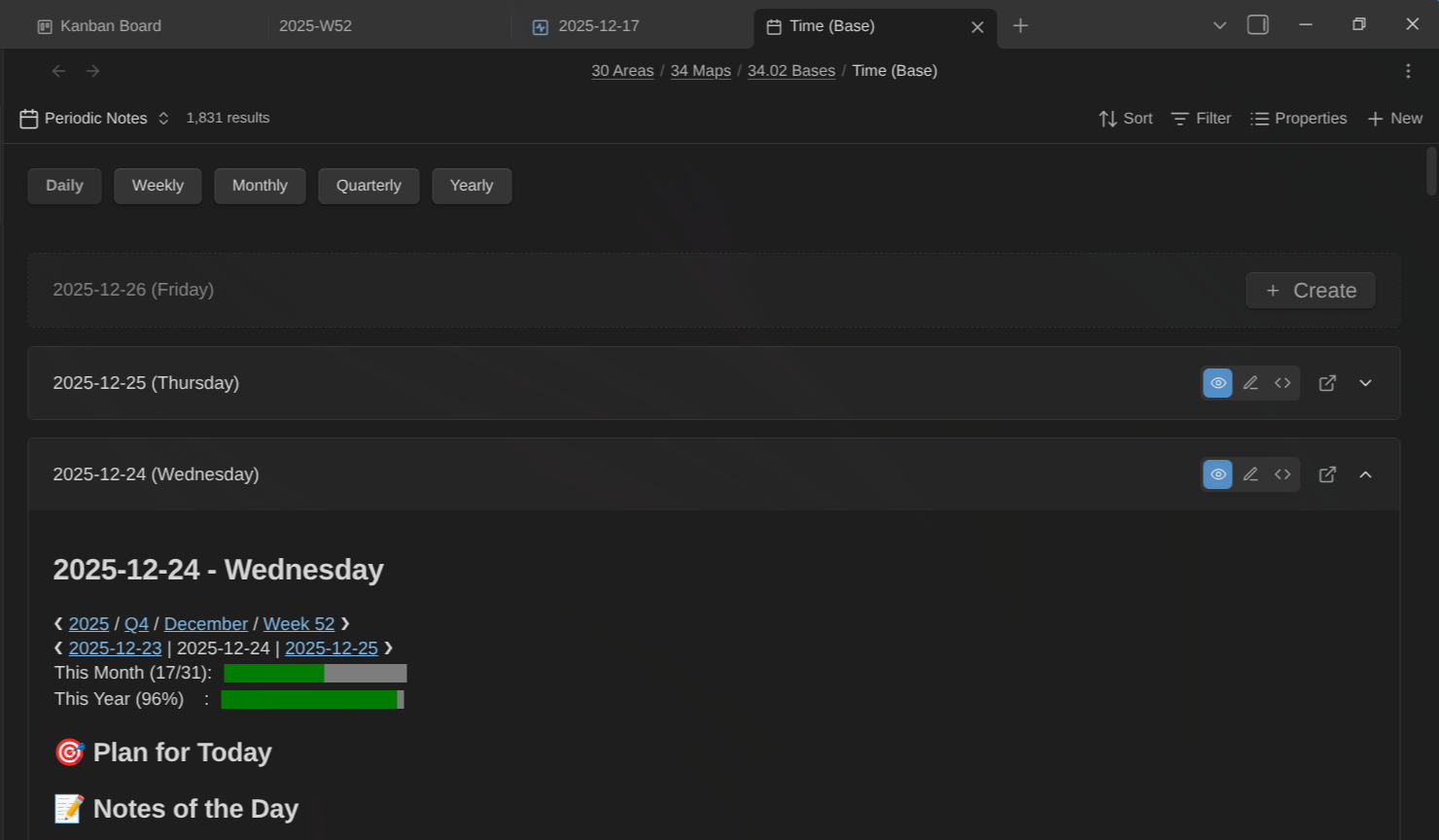
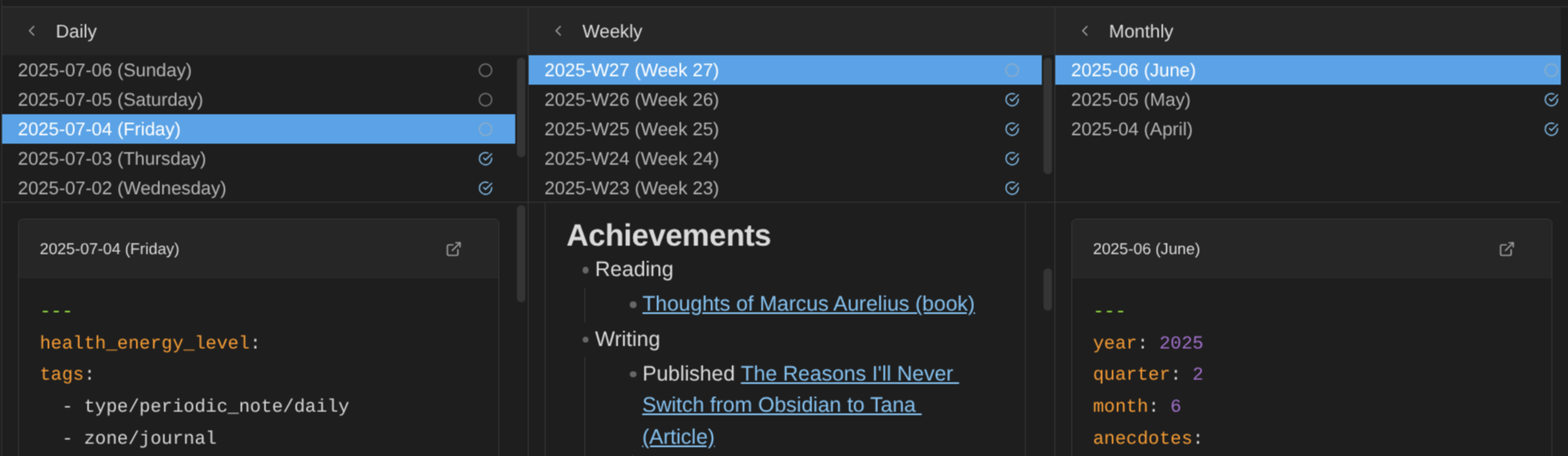
This is a plugin I've created to help navigate and manage your journal and periodic reviews with purpose-built Obsidian Base views.
This plugin adds two custom view types for daily, weekly, monthly, quarterly, and yearly notes.
Periodic notes view:
Periodic Review view:
Overview:
Details: Journal Bases plugin for Obsidian
Life Tracker
Capture and visualize the data that matters in your life. This Obsidian plugin adds a "Life Tracker" Obsidian Base type that transforms your tracked data into beautiful visualizations.
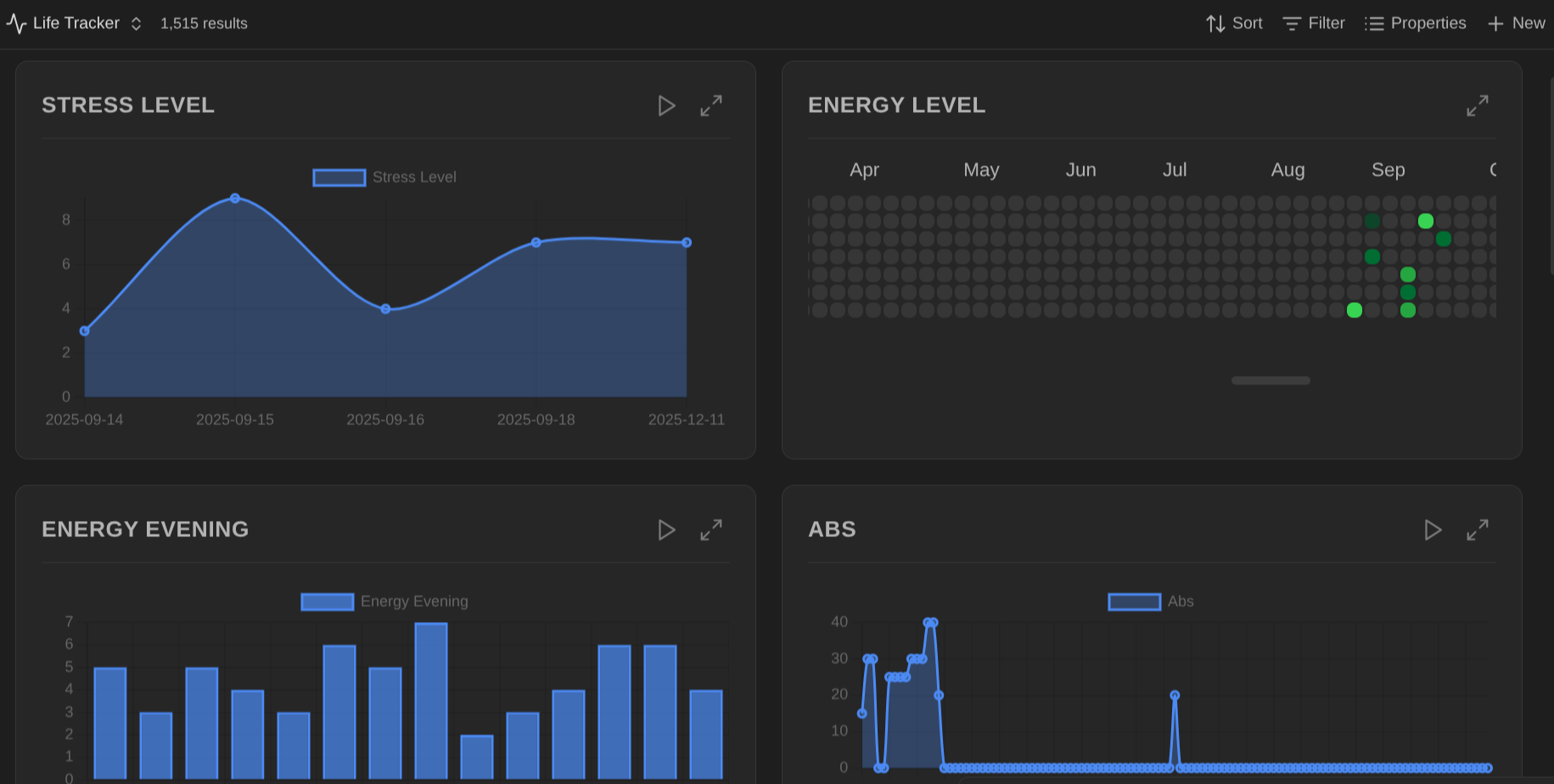
- 12 visualization types: Heatmap, Line, Bar, Area, Pie, Doughnut, Radar, Polar Area, Scatter, Bubble, Tag Cloud, Timeline
- GitHub-style heatmaps with 5 color schemes (green, blue, purple, orange, red)
- Animated charts with configurable duration and play/pause controls
- Interactive elements: click chart elements to open source notes, hover for detailed tooltips
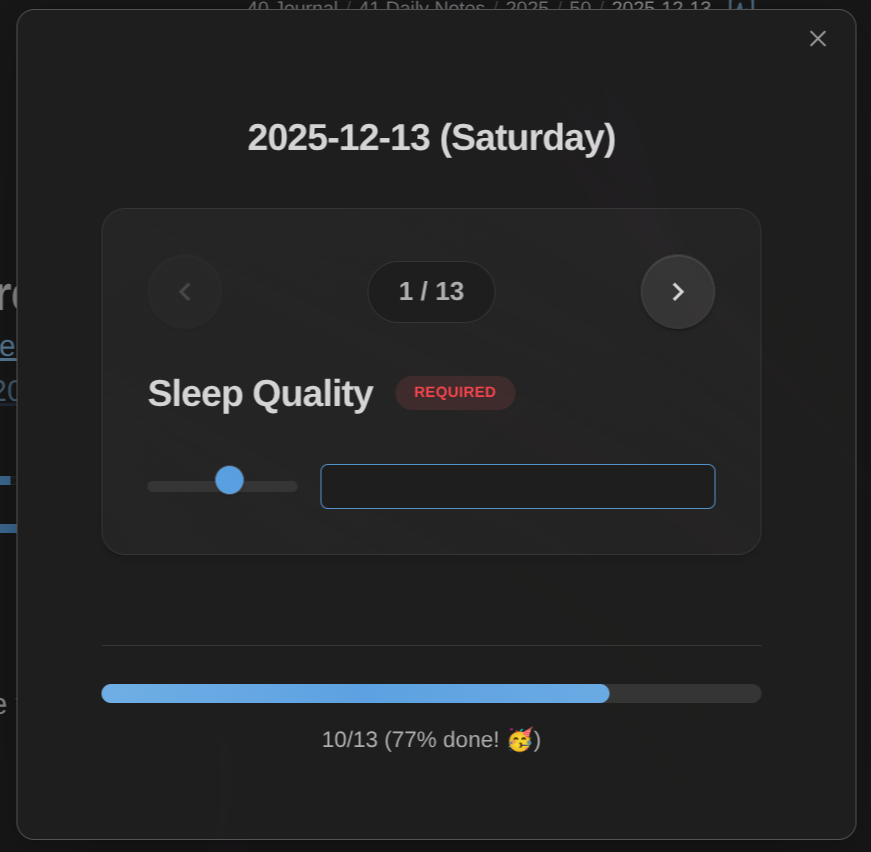
It also includes support for efficient data capture:
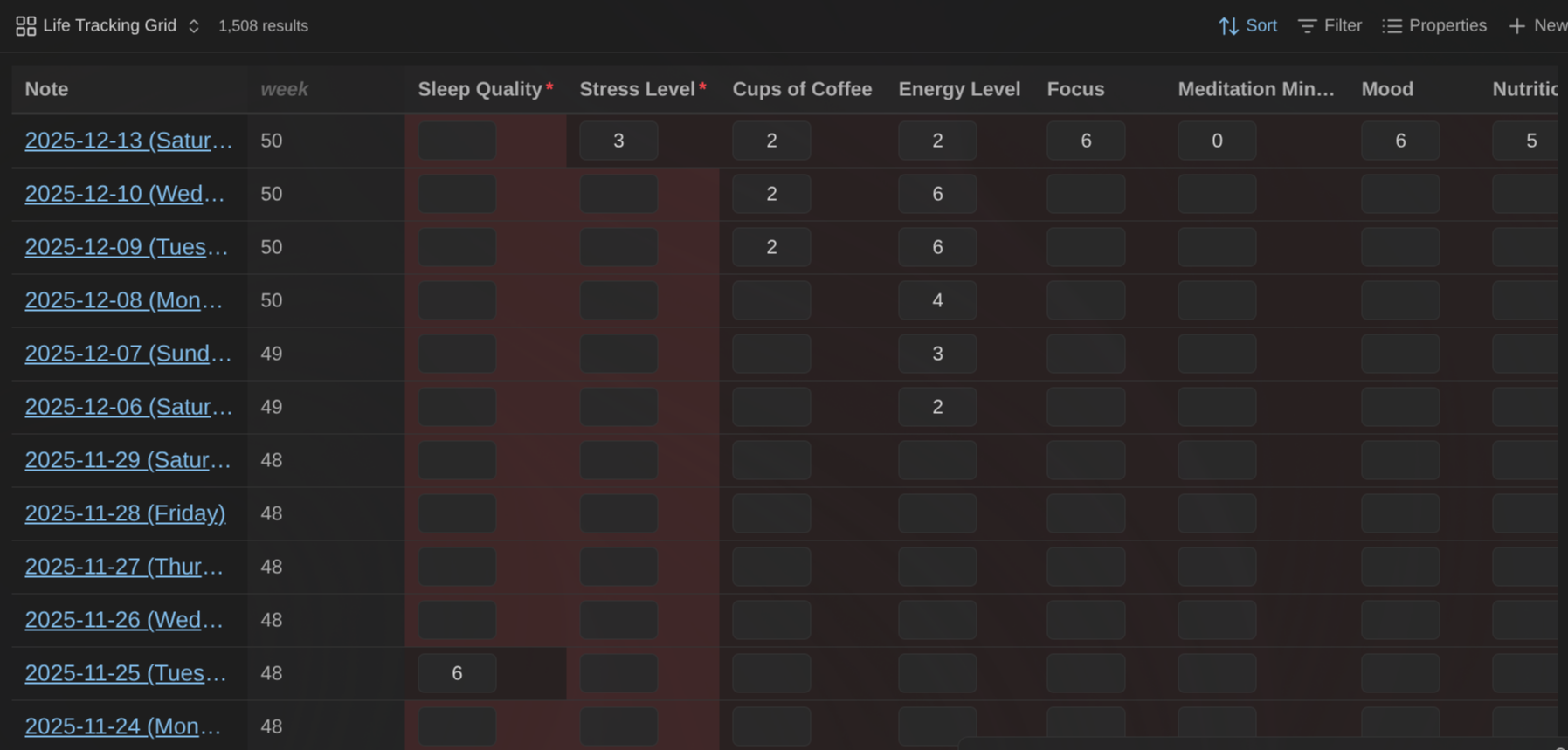
Overview:
Details: Life Tracker plugin for Obsidian
Heatmap Calendar
Generate GitHub like heatmaps based on Dataview queries.
Using this plugin, you can generate heatmaps just like the activity one on GitHub user profiles. This works by using a Dataview query to select pages to include, and constructing an array containing the data to render.
This is great to track your progress in various domains (e.g., exercise, meditation, eliminating bad habits, etc).
Details: Heatmap calendar plugin for Obsidian
Tomorrow's daily note
Easily open tomorrow's daily note.
Also less useful if you're using the Notebook Navigator plugin for Obsidian since it enables doing the same through its built-in calendar view.
Details: Tomorrow's daily note plugin for Obsidian
Task Management
TaskNotes
Task and note management plugin built on the principle of "one note per task". It stores task information in note properties (i.e., YAML frontmatter), enabling compatibility with other plugins and external tools while maintaining full portability.
With this plugin, any task can be converted to a dedicated note, which can store details about the why, the what, the timing, the priority, etc.
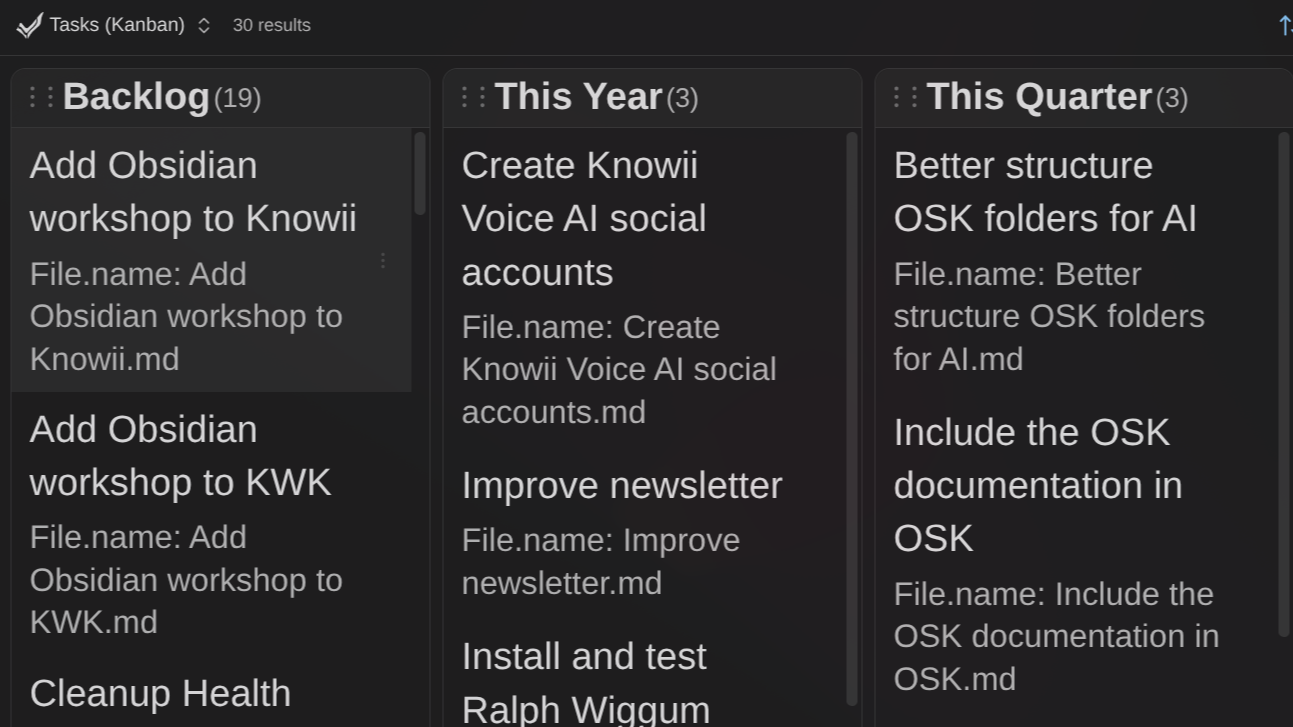
TaskNotes includes the following capabilities:
- Task Properties: Each task can include a title, status, priority, due date, scheduled date, contexts, tags, time estimate, and recurrence pattern. You can also add custom fields.
- Time Tracking: A time tracking feature allows you to record the amount of time that you spend on tasks. This data is stored in the task's frontmatter as time entries with start and stop times.
- View Types: Eight different views are provided: Task List, Notes, Agenda, Kanban, Mini Calendar, Advanced Calendar, Pomodoro, and Pomodoro Stats.
- Editor Integration: Inline task widgets display task information within your notes. An instant conversion feature transforms checkbox tasks into TaskNotes. A natural language parser can interpret phrases to create structured tasks.
- Calendar Integration: The plugin can subscribe to external ICS calendars from Google Calendar, Outlook, and other calendar systems. Time-blocking features are also included.
- External Tool Compatibility: The YAML frontmatter format is compatible with other Obsidian plugins and can be processed by external tools.
In my approach, everything is a note, including goals, plans, projects, and thanks to this plugins, tasks as well!

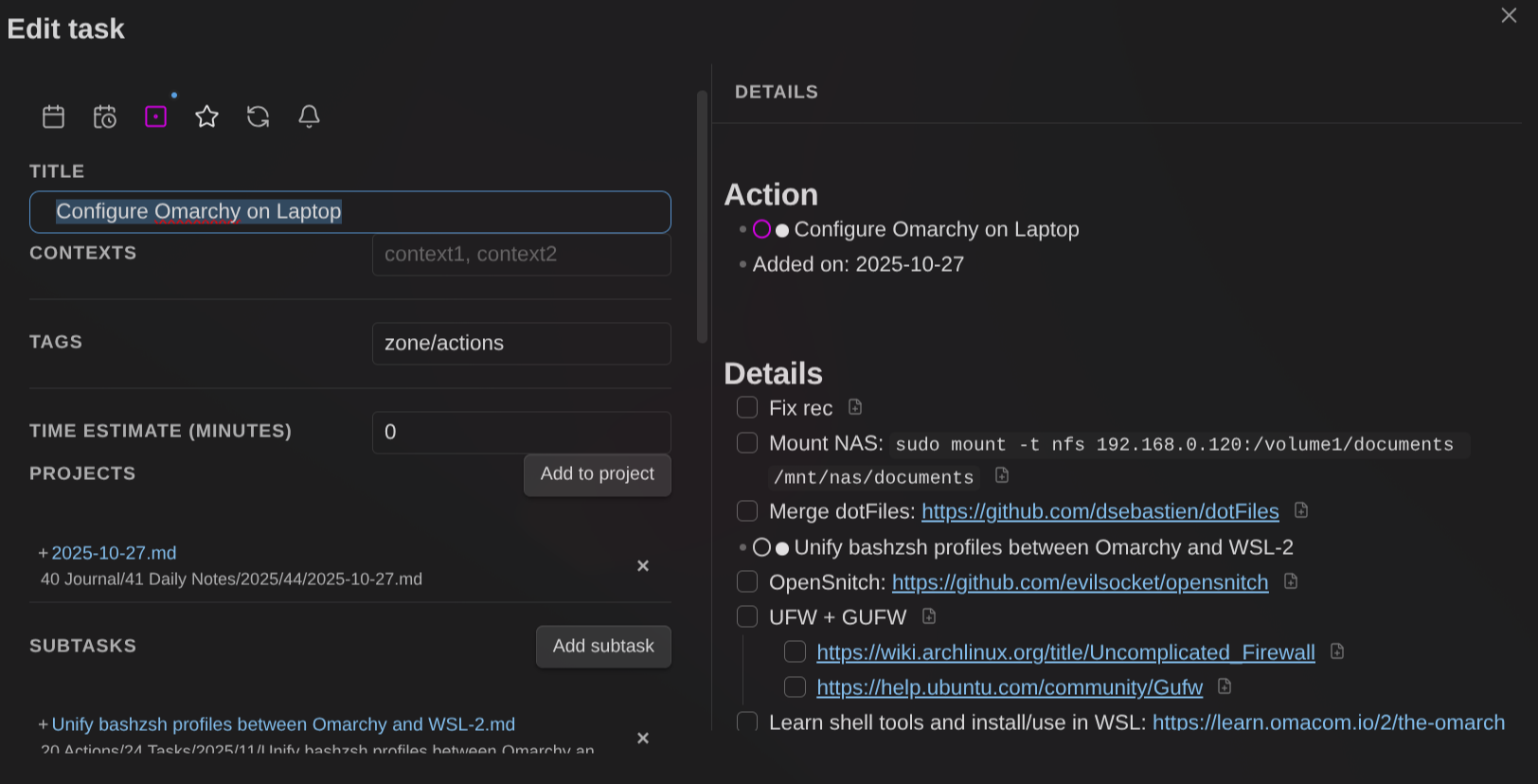
Details: TaskNotes plugin for Obsidian
Kanban
This plugin enables creating and managing tasks using markdown-backed Kanban Boards.
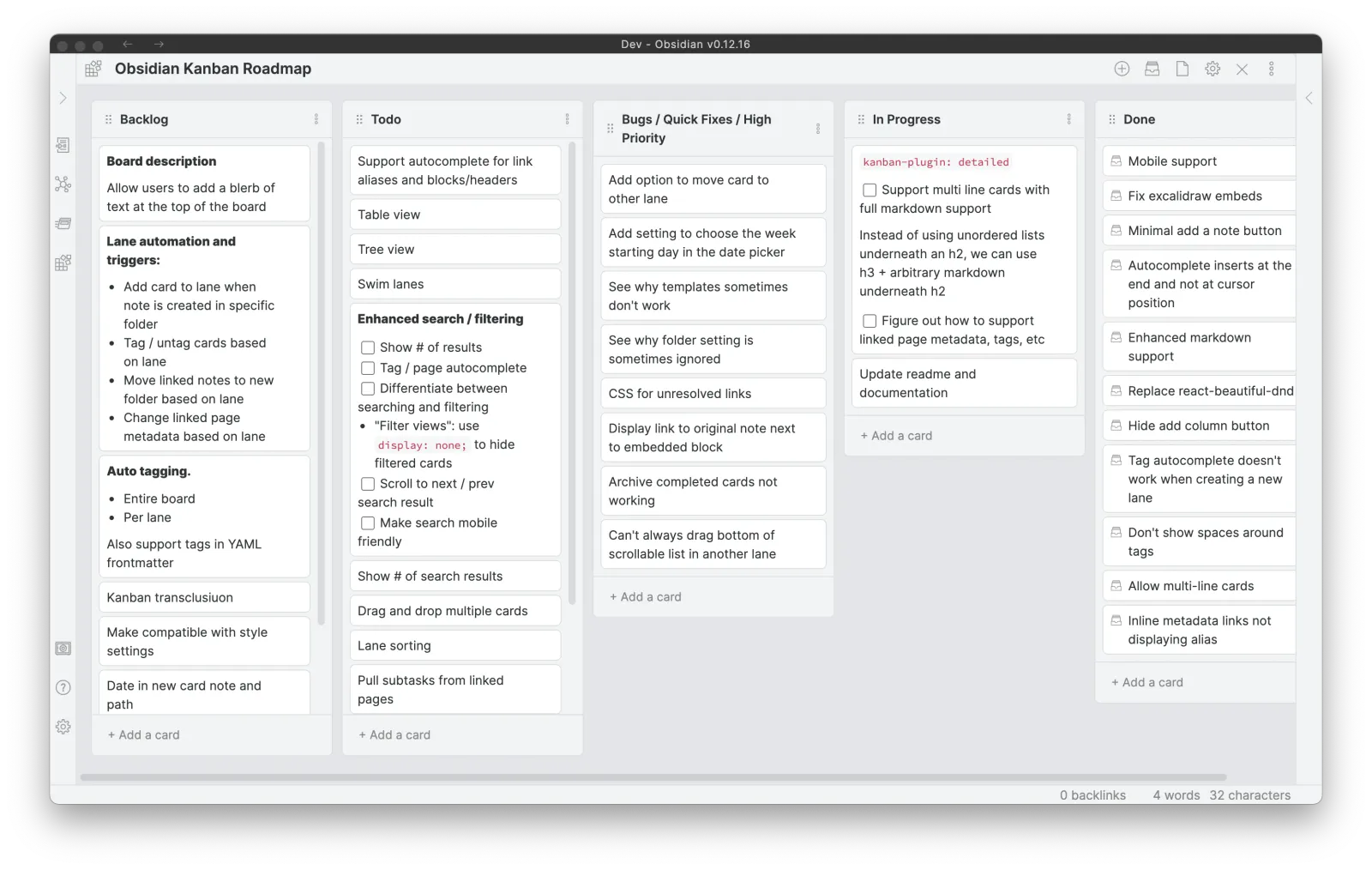
While the TaskNotes plugin for Obsidian also provides a Kanban view, I still like the simplicity that this plugin provides (just a list of Markdown cards). Actually, this simple Kanban Board may include links to TaskNote tasks, closing the gap between more advanced tasks with details/background and simple TODOs.
Details: Kanban plugin for Obsidian
Tasks
The Obsidian Tasks plugin helps you track tasks across your Obsidian vault. It supports due dates, recurring tasks, querying, filtering, etc. This plugin, combined with the Kanban plugin for Obsidian and the TaskNotes plugin for Obsidian is a killer combo.
Details: Tasks plugin for Obsidian
Rollover daily todos
If your list of tasks for the day is part of your daily notes (which I highly recommend for clarity & focus), then this plugin is a must-have. It will automatically copy the incomplete tasks to the list of the next day. This makes it a breeze to continue where you left things off.
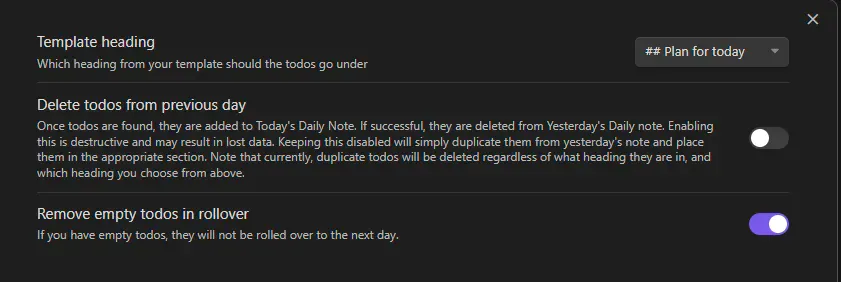
Details: Rollover daily todos plugin for Obsidian
Querying & Data
Dataview
Dataview is one of the most powerful Obsidian plugins out there. Using it, you can add queries to your notes to fetch information from anywhere in your knowledge base based on location, tags, property values, etc.
To give you an idea of how powerful it is, take a look at these examples, taken directly from the Obsidian Starter Kit.
Find quotes corresponding to a specific author:
LIST FROM #quotes and [[2020-04-20-2020-04-20-quickly-amend-a-git-commit]] SORT file.name ASC
Find recently modified notes:
$=dv.list(dv.pages('').sort(f=>f.file.mtime.ts,"desc").limit(5).file.link)
Find orphan notes:
TABLE file.ctime AS "updated"
FROM ""
WHERE length(file.inlinks) = 0 AND length(file.outlinks) = 0 AND length(file.tags) = 0 AND file.name != "Orphans"
SORT file.mtime desc
Find duplicate notes:
function listFileNameIssues(dv) {
  let pages = dv.pages();
  let groups = pages.groupBy(p => p.file.name.toLowerCase());

  for (let group of groups) {
    let count = 0
    for (let page of group.rows.sort(p => p.file.path, 'asc')) {
      count += 1;
    }

    if (count === 1 ) {
      continue;
    }

    for (let page of group.rows.sort(p => p.file.path, 'asc')) {
      dv.paragraph(page.file.link + ': ' + page.file.path);
    }
  }
}

listFileNameIssues(dv);
Pick random notes:
const limit = 10;
const notes = dv.pages().sort(() => Math.random()).slice (0, limit).map(note => note.file.link);
dv.list(notes);
Count the number of notes:
$=dv.pages().length()
And this is just the tip of the iceberg.
The coolest part is that Dataview automatically shows you the up-to-date query results.
Details: Dataview plugin for Obsidian
Dataview Serializer
This is a plugin that I've created and that adds a major feature currently not supported by the Dataview plugin. It requires the Dataview plugin to function.
The feature added by this plugin is the capability of automatically serializing dataview queries to Markdown.
When you write a normal Dataview query, "all you get" is a live view showing the results of the query. The output is never saved, it's just refreshed every time you look at the note containing the query. If you open that note with another editor, all you can see if the query, not the results.
With this plugin, you not only see the query, but also the output. This is powerful because it means that the data IS there. If you publish the note (e.g., using Obsidian Publish, Quartz or GitHub Pages), then the data will also be there. As an added benefit, the data may also appear on your knowledge graph, which is mighty powerful.
If you like Dataview, then I highly recommend using this plugin. Not only because it will keep your data safe and usable from other tools, but also because it makes the query results available for AI to use!
Here's what queries look like when using this plugin:
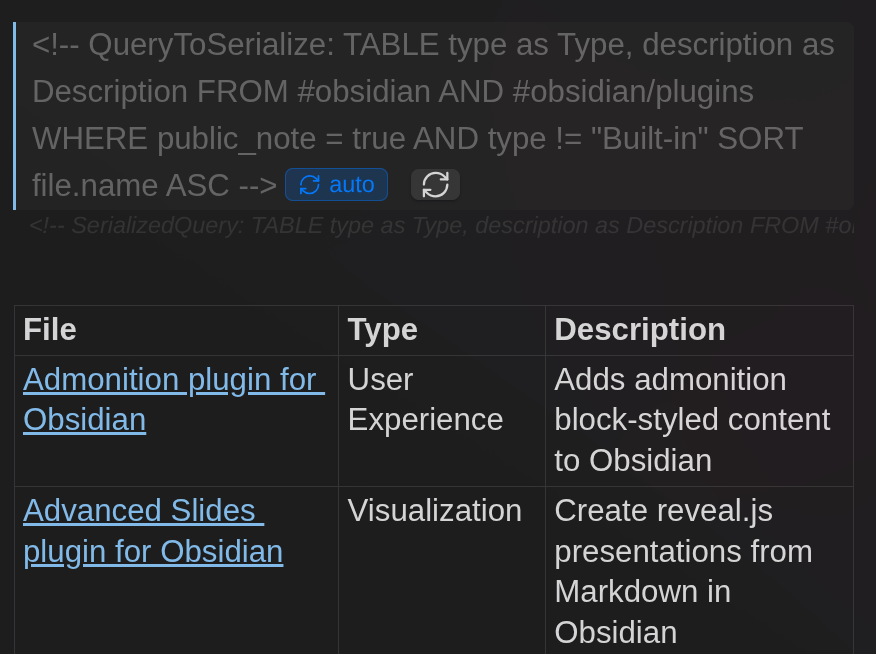
Most Dataview queries are supported, including lists, tables, inline queries, and even DataviewJS!
<!-- QueryToSerialize: LIST FROM #type/quote WHERE public_note = false SORT file.name ASC -->
<!-- SerializedQuery: LIST FROM #type/quote WHERE public_note = true SORT file.name ASC -->
- [[‘Classic’ – a book which people praise and don’t read]]
- [[20 years from now, the only people who will remember that you worked late are your kids]]
- ...
The first part with "QueryToSerialize" contains the query that needs to be executed. The second part, with "SerializedQuery", is added automatically by this plugin, and corresponds to the Markdown version of the query results.
Every time a note containing a serialized query is opened, the queries are evaluated again, and the serialized output gets updated. It's also possible to refresh the output of all Dataview Serializer queries.
I use this plugin extensively in the Obsidian Starter Kit, for instance for Maps of Content, Dashboard queries, and more!
Details: Dataview Serializer plugin for Obsidian
Datacore
The Datacore plugin for Obsidian is the so-called successor of Dataview. It is being developed by the same maker (Michael Brenan).
Fundamentally, the goal is the same: index your notes, and create live-updating views. But Datacore focuses on creating a much better user experience and user interface.
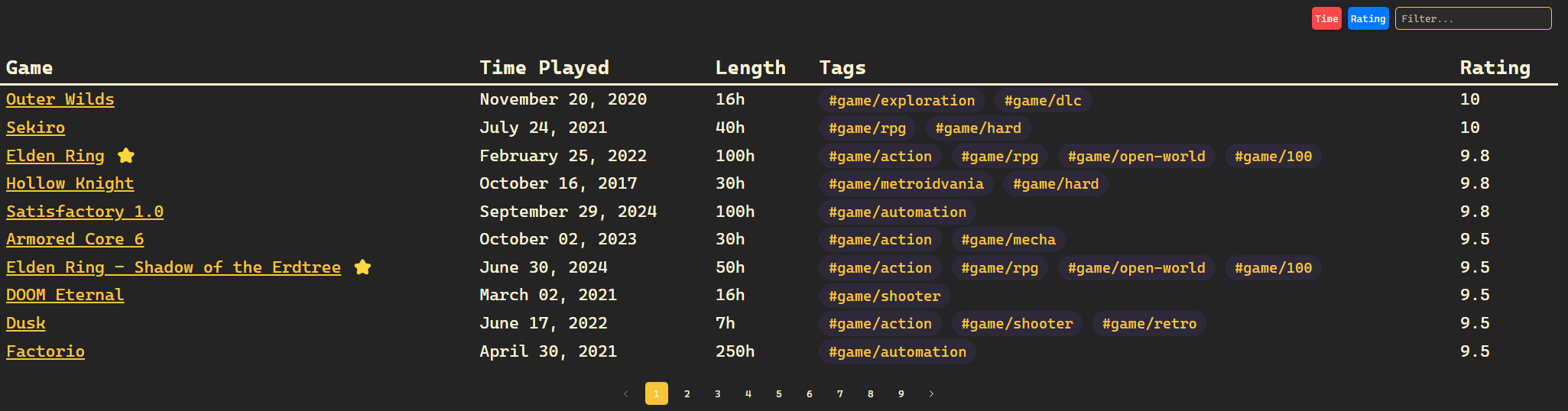
Although this plugin is really powerful, I'm not convinced yet. I have enough "power" at my disposal with the Dataview plugin combined with Dataview Serializer. And as far as I know, this plugin suffers from the same issue as Dataview: live results, but nothing in the actual markdown files, meaning you can't leverage the data with AI.
Details: Datacore plugin for Obsidian
OmniSearch
The Omnisearch plugin for Obsidian adds a powerful way to search and explore the notes in your vault. The authors describe it as "a search that just works".
Details: Omnisearch plugin for Obsidian
Sentinel
Sentinel is a plugin that enables users to automatically update note properties or execute commands based on document visibility changes within Obsidian.
Details: Sentinel plugin for Obsidian
Templating & Automation
Templater
The Templater plugin for Obsidian is a powerful templating engine. It provides many functions to help you create really cool templates.
The benefit is that you can design clearly defined note types, then templates for each of those making it it much easier to be systematic in the way you take notes.
Here's an example taken from the Obsidian Starter Kit which uses the Templater plugin extensively:
---
tags:
- weekly_notes
---

# Meeting

## Participants
...

## Agenda
...

## Minutes
...

## Actions
...
Once you have created a template, you can easily add it to any note using the ALT/Cmd + E shortcut.
Details: Templater plugin for Obsidian
QuickAdd
This plugin makes it a breeze to quickly add new notes to your Obsidian vault.
In includes:
- Templates: ways to create new notes (composes well with templating plugins such as Templater plugin for Obsidian)
- Capture: quickly add content to predefined files (e.g., add a link to the current note under a specific section of your daily note)
- Macros: compound templates and captures together into chained workflows (e.g., quickly creating a new note, applying a template to it, adding it to your daily note)
- Multi-choices: organizational (folders of other choices)
- ...
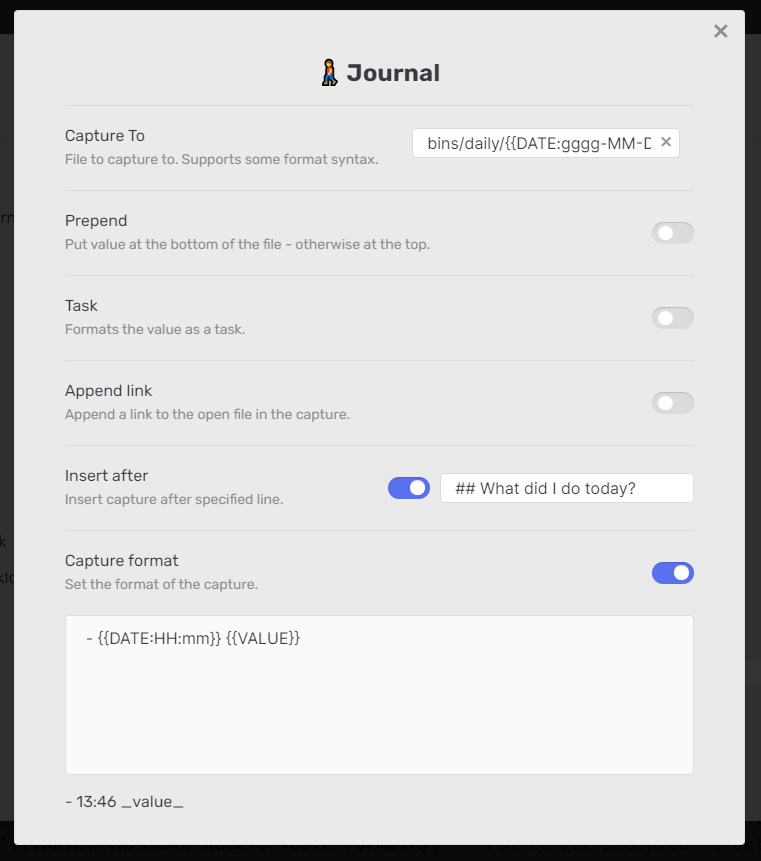
Details: QuickAdd plugin for Obsidian
Auto Note Mover
The Auto Note Mover is a simple but powerful plugin. It provides a way to automatically move notes around within your knowledge base. This is great as it removes the need to manually file notes.
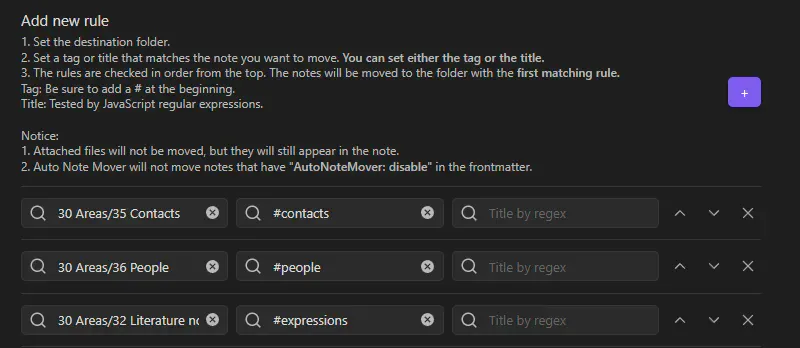
TIP: It's also possible to automatically file notes using the Templater plugin for Obsidian using await tp.file.move(...).
Details: Auto Note Mover plugin for Obsidian
Expander
This is a plugin I've built to replace variables across your Obsidian vault using HTML comment markers.
You simply configure key-value pairs in settings, and this plugin will automatically substitute them throughout your notes, and keep those updated too.
Details: Expander plugin for Obsidian
Navigation & Productivity
Notebook Navigator
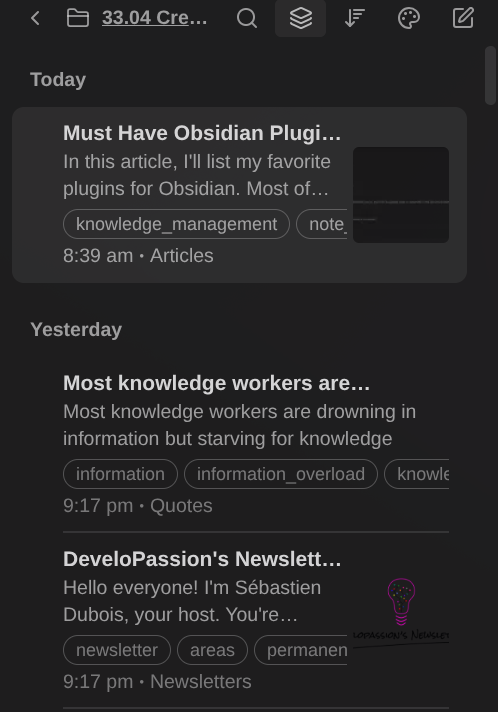
A modern file explorer plugin for Obsidian that is a great alternative to the default File explorer core plugin for Obsidian.
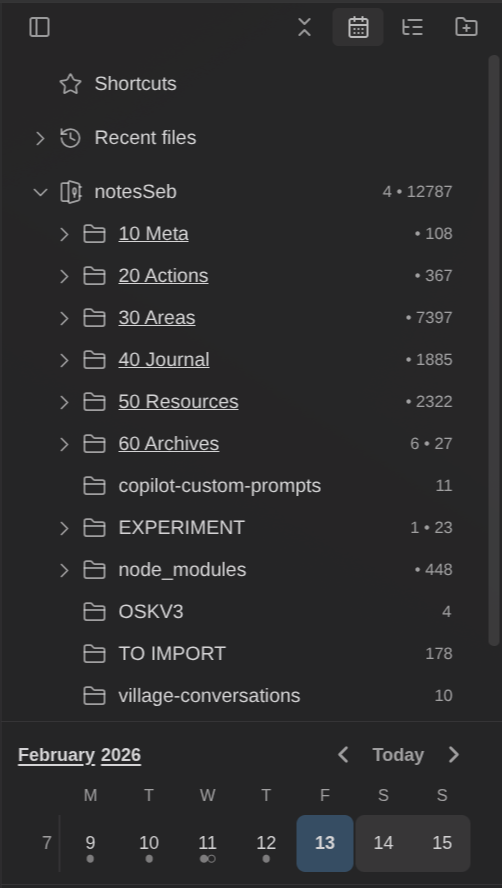
It provides a powerful dual-pane interface, and enables advanced navigation through folders, tags, pinned notes, search, a calendar view, and a ton more. All with extensive customization and performance optimization.
Details: Notebook Navigator plugin for Obsidian
Quick Switcher Plus Plus
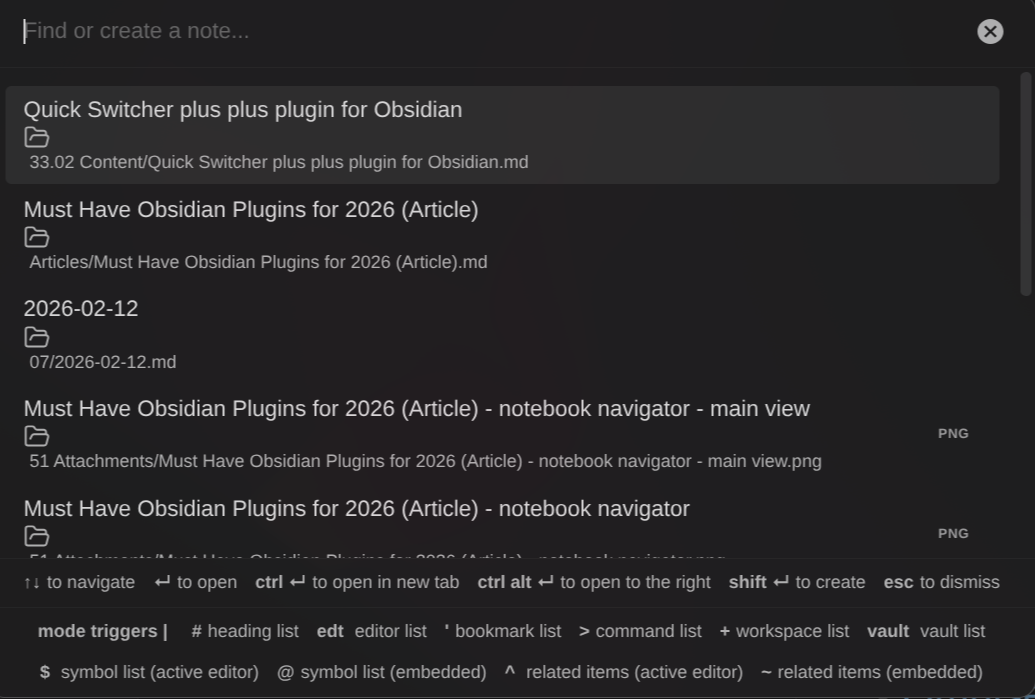
This plugin extends the built-in Quick file switcher (CTRL/CMD + O) and lets you:
- Find files by headings instead of file names
- Navigate to symbols (headings, hashtags, links, etc)
- Navigate between open editors and side panels
- Switch between workspaces
- Search bookmarks
- Run commands
- …
Details: Quick Switcher plus plus plugin for Obsidian
Doubleshift
Obsidian Plugin to open the command palette by pressing shift twice. Software developers will love this one!
Details: Doubleshift plugin for Obsidian
Reveal Active File
A simple plugin that adds a button to the file navigator that can be used to quickly locate the currently active file in the folder hierarchy.
Less useful since Obsidian 1.8.2 was released, because it includes an "Auto-reveal current file" setting. That setting is a toggle. Once enabled, it always reveals the active file. If you prefer to manually reveal the active file by clicking a button, it's not solving that. But since that version, it's also possible to invoke the "Files: Reveal current file in navigation" command to do the same.
Details: Reveal Active File Button plugin for Obsidian
Homepage
The homepage plugin does exactly what it says: it lets you create a homepage for your knowledge base.
The homepage is just a note like any other, meaning that you can add whatever you want to it: text, titles, images, tasks, Dataview queries, etc.
Details: Homepage plugin for Obsidian
Focus Mode
Adds a Ribbon icon and commands to toggle a focus mode that removes visual “noise”, helping you focus on writing.
Details: Focus Mode plugin for Obsidian
Recent files
Display a list of most recently opened files.
Details: Recent files plugin for Obsidian
Pane Relief
This plugin helps managing panes and tabs in Obsidian (especially using the keyboard).
It adds a persistent per-tab navigation history, new commands, and more.
Details: Pane relief plugin for Obsidian
Smart random note
This plugin adds a way to open a random note based on the list of search results. This is a great addition to explore your knowledge base randomly (always useful to re-discover old/forgotten notes)
Details: Smart random note plugin for Obsidian
Review
Helps to review notes over time.
Details: Review plugin for Obsidian
Visualization
Excalidraw
This plugin integrates Excalidraw into Obsidian. It's a powerful alternative to the built-in Canvas feature of Obsidian. It saves sketches/visualiations in a text-based, open file format, supported by various tools.
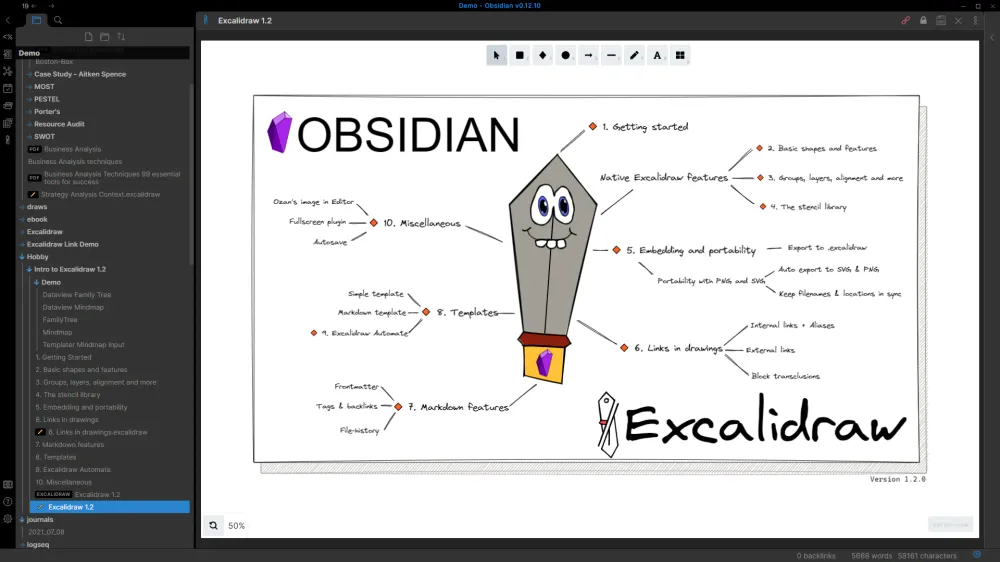
Details: Excalidraw plugin for Obsidian
MindMap
An Obsidian plugin for displaying markdown notes as mind maps using Markmap.
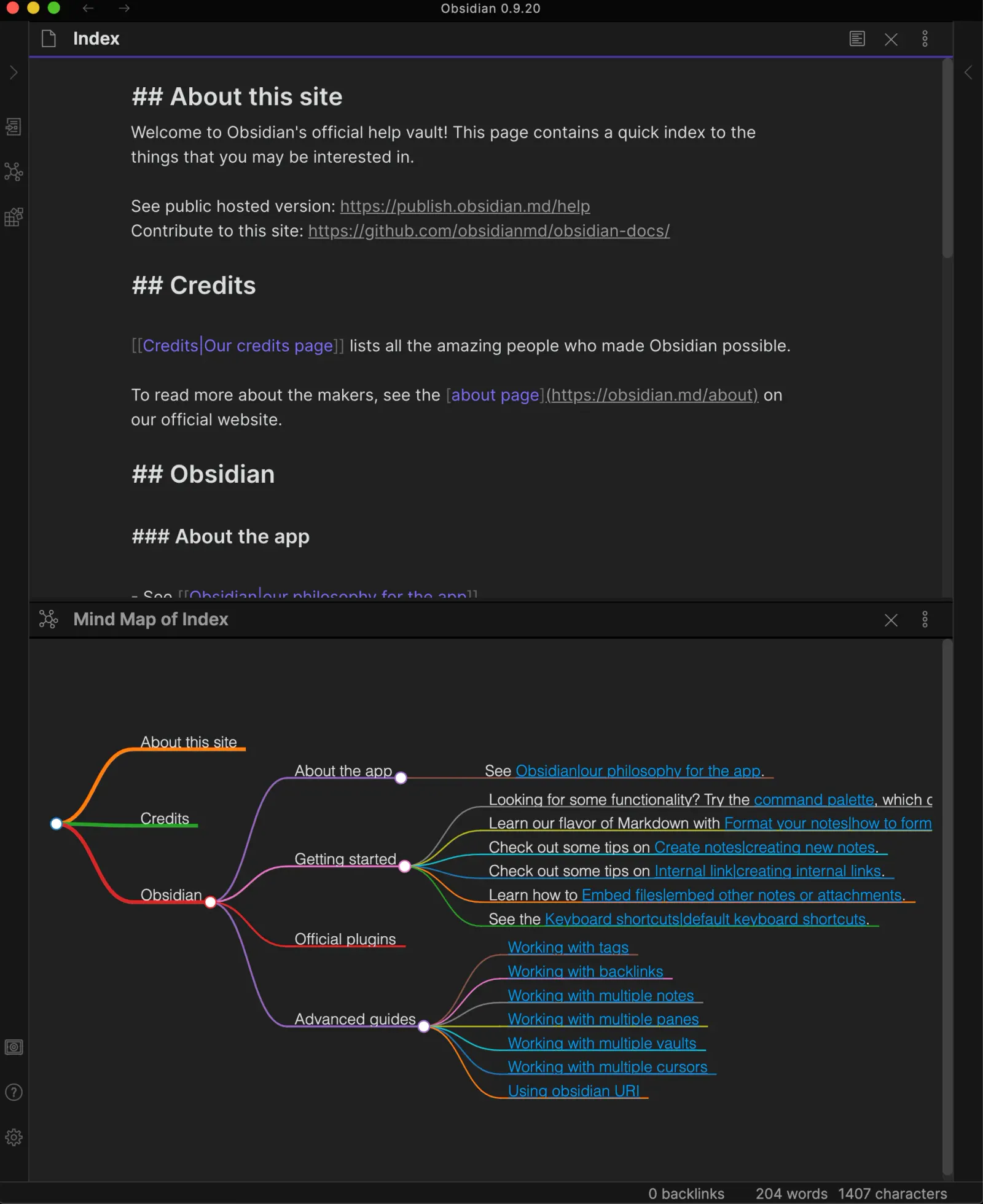
Details: Mindmap plugin for Obsidian
Maps
Map is a type of view you can use in Obsidian Bases. This plugin was created by the Obsidian team and is available as an official community plugin.
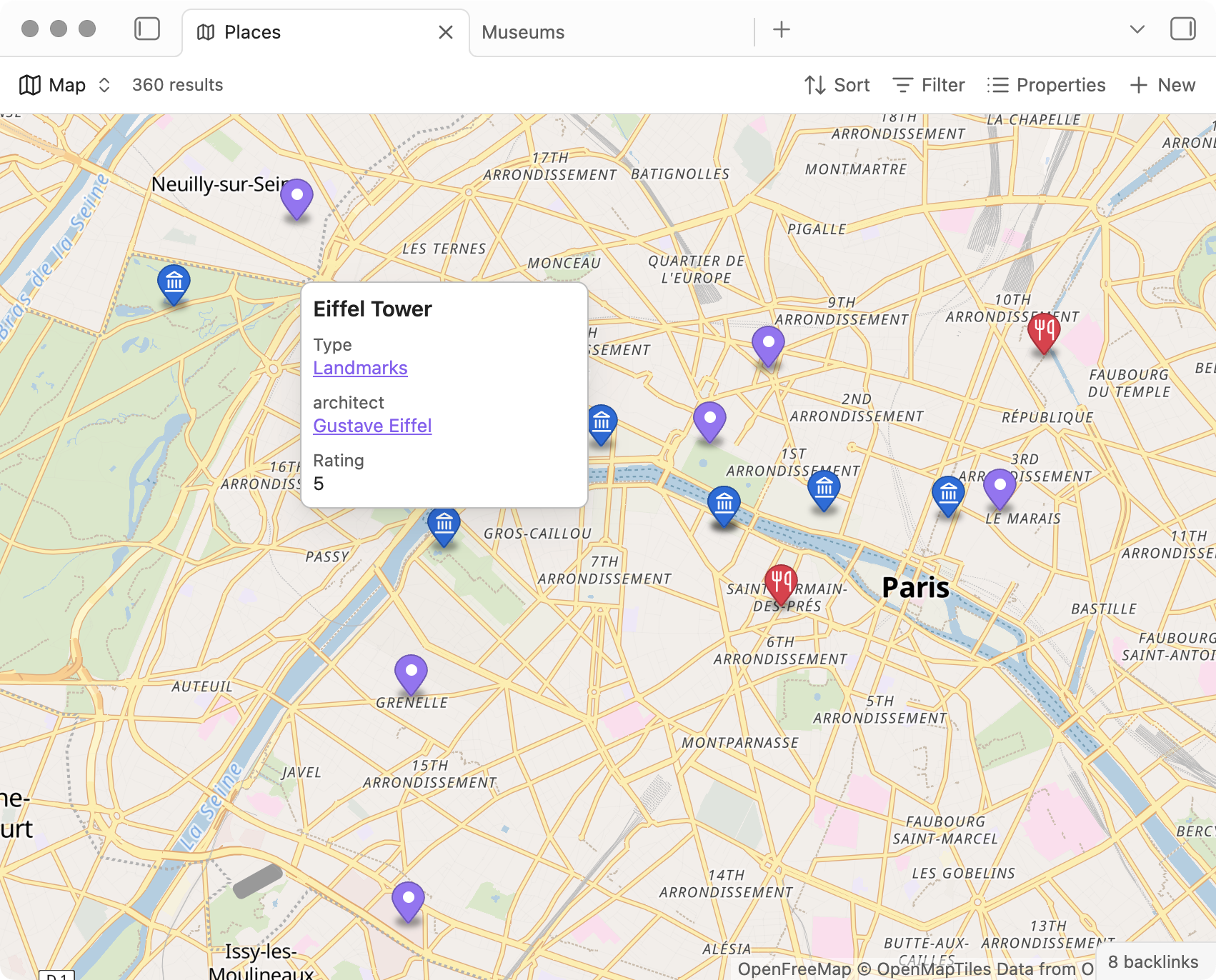
Here's an example of what I did with this one: How to capture GPS coordinates, import and display those in Obsidian
Details: Maps plugin for Obsidian
Search in Canvas
Enables searching within the Canvas view.

Details: Search in canvas plugin for Obsidian
Text Editing & Writing
Various complements
This plugin boosts productivity by automatically completing what you type, proposing to add links when some text matches the title of a note, etc.
Details: Various complements plugin for Obsidian
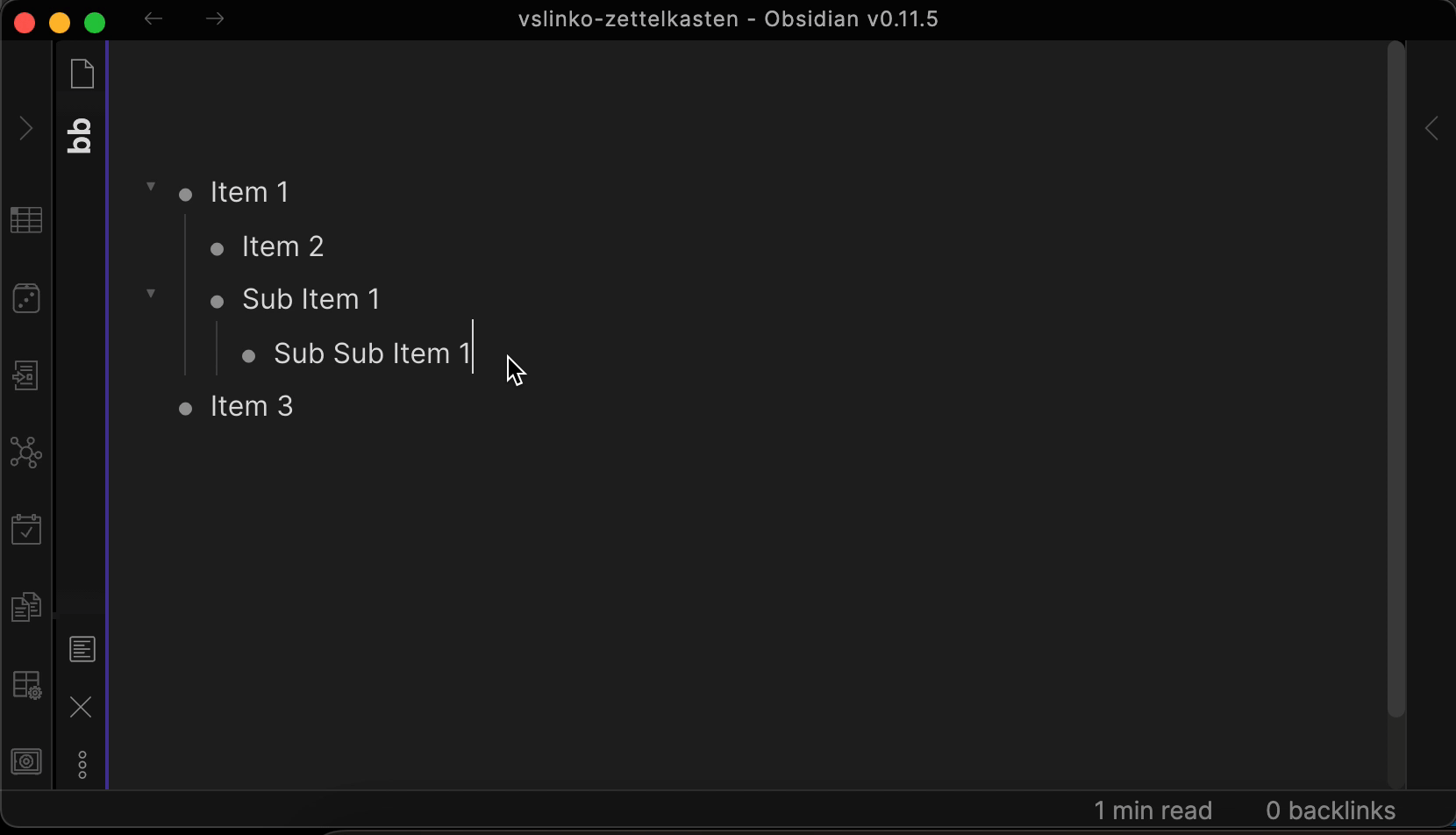
Outliner
Allows you to work with your lists exactly like in Workflowy, RoamResearch, LogSeq, ...
Details: Outliner plugin for Obsidian
Zoom
This plugin lets you "zoom" into headings and lists. This makes it much easier to focus on specific parts of long notes.
Details: Zoom plugin for Obsidian
Text Transporter
The Text Transporter plugin is a Swiss Army Knife of text manipulation for Obsidian. Clearly a must-have to apply transformations to your notes.
Details: Text transporter plugin for Obsidian
Notes refactor
This plugin lets you copy/extract text selections from a note into other ones. It adds to the features offered by the text transporter plugin.
Details: Notes refactor plugin for Obsidian
Text Snippets
This plugins allows defining text templates and replacing those automatically in your notes for faster typing. Create your own snippets almost like in many text editors and IDEs.
Note that I personally prefer using external text expanders such as Espanso, since those work in all programs; not only Obsidian.
Details: Text Snippets plugin for Obsidian
Natural language dates
This plugin allows you to use natural language dates more easily.
Details: Natural language dates plugin for Obsidian
Multi Tag
Tag all notes in a folder (and sub-folders) at once.
Details: Multi Tag plugin for Obsidian
Paste URL into Selection
This plugin makes it a breeze to add a link to text.
Without this plugin, to do that, you have to:
- Select the text
- Hit CTRL/CMD + K
- Paste the link
With this plugin, you just have to select the text and paste the link.
Details: Paste URL into selection plugin for Obsidian
ProgressBar
This plugin makes it easy to add progress bars to your notes. I have added examples in daily, monthly, quarterly, and home notes.
Here’s how it looks:

Details: ProgressBar plugin for Obsidian
Table editor
An editor for Markdown tables. It can open CSV data and data from Microsoft Excel, Google Sheets, Apple Numbers and LibreOffice Calc as Markdown tables from Obsidian Markdown editor.
Details: Table Editor plugin for Obsidian
Editing Toolbar
This plugin adds a visual toolbar you can use to modify text styles in your notes. If you're not used to Markdown yet, then this can prove very useful.
Demo: https://github.com/PKM-er/obsidian-editing-toolbar/raw/master/editing-toolbar-demo.gif

Details: Editing toolbar plugin for Obsidian
Dictionary
A dictionary within Obsidian. Useful to quickly find word definitions.
Details: Dictionary plugin for Obsidian
Content Capture & Media
Paste image renamer
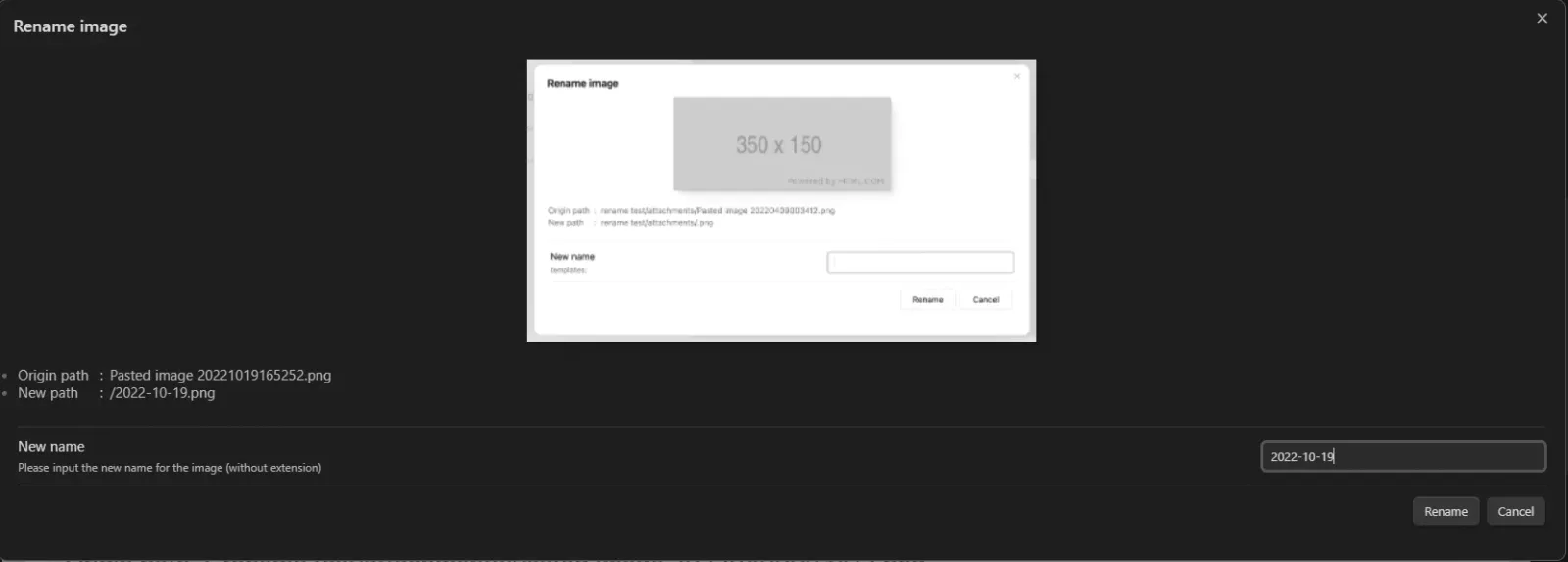
The Paste image renamer plugin makes it a breeze to rename images and attachments when you add those to your Obsidian vault. This is a must-have.
Details: Paste image renamer plugin for Obsidian
Image Context Menus
Add useful context menus for images, URLs and PDFs.
This plugins add context menu entries to images:
- Copy
- Open in default app
- Show in system explorer
- Reveal in navigation
- ...
Details: Image Context Menus plugin for Obsidian
Simple Embeds
This plugin automatically turns links into embeds within Obsidian.
Makes it a breeze to embed YouTube videos and Tweets in your notes.
Details: Simple embeds plugin for Obsidian
Extract URL
This plugin makes it really easy to capture external content into Obsidian. It extracts Markdown compatible with Obsidian out of URLs. Thanks to this plugin, you can paste the URL of a Website in an Obsidian note, invoke a command and have the URL be replaced by the content converted into Markdown.
Details: Extract URL plugin for Obsidian
Image in editor
Enables you to view Images, Transclusions, iFrames and PDF Files within the Editor without a necessity to switch to the Preview mode.
Details: Image in editor plugin for Obsidian
Text Extractor
This plugin is useful to quickly extract text from images (e.g., png, jpg) and PDF documents.
Note that it doesn't work on mobile...
Details: Text extractor plugin for Obsidian
Book Search
This plugin makes it a breeze to download book metadata from the Web. It generates notes for books you import, using a pre-configured template
This plugin uses the Google Books API to download book metadata and cover. Once fetched, it automatically creates a note for the book. This plugin is compatible with the Templater plugin for Obsidian.
Details: Book search plugin for Obsidian
Note Quality & Maintenance
Linter
This Obsidian plugin formats and styles notes automatically, based on the rules you configure. This helps a lot to maintain a consistent knowledge base.
Details: Linter plugin for Obsidian
Metadata Menu
The Metadata Menu plugin is a powerful metadata management tool designed for "data quality enthusiasts" who want structured, consistent property handling across their vault.
Details: Metadata Menu plugin for Obsidian
Clear Unused Images
This plugin makes it easy to cleanup old and unused images from your vault. It's great for maintenance.
Using the Ribbon icon or associated commands, you can remove images that aren’t used in any of your notes.
Details: Clear unused images plugin for Obsidian
Update Time
This plugin updates note properties to include creation and last update times.
It automatically modifies the update time when notes are modified. And it can be configured to ignore certain folders.
This plugin is useful to track creation and last update time on your notes. It automatically adds or updates the “created” and “updated” metadata properties on your notes.
I personally use it so that I can add those timestamps to my public notes.
Details: Update time plugin for Obsidian
Broken Links
This plugin identifies internal links in your vault that don't connect to any existing files, including broken links to headings and blocks. It provides three view options: Folder View (organizes broken links by folder structure with counts), File View (lists files with broken links, sortable alphabetically or by quantity), and Link View (groups broken links by name showing which files contain them).
When you discover a broken link in the interface, clicking it opens the containing note so you can either edit the link or create the missing note using built-in Obsidian commands. This helps maintain vault hygiene by identifying orphaned references and making it easy to fix them. The plugin is useful for large vaults where broken links can accumulate over time as notes are renamed, moved, or deleted.
Details: Broken Links plugin for Obsidian
Find unlinked files
This plugin enables you to quickly identify orphaned notes (i.e., notes with no backlinks) and notes with broken links.
Details: Find unlinked files plugin for Obsidian
List Modified
Automatically add a list of all modified notes within your daily notes. Makes it a breeze to find what you recently modified.
Note that I personally prefer using Dataview plugin for Obsidian and Dataview Serializer plugin for Obsidian for this purpose.
Details: List Modified plugin for Obsidian
Remember Cursor Position
Automatically preserves your cursor location, scroll position, and text selection across all notes. When you navigate between notes or follow links, you return to exactly where you left off. The positions are stored in a file (with a configurable path), so everything is restored even after closing and reopening Obsidian.
Details: Remember Cursor Position plugin for Obsidian
User Interface & Customization
Folder Note
This plugin enables creating “Folder notes”. To do so, right click on a folder, and select “Folder Note Commands > Create markdown folder note”. Once done, a new note will be created in the folder, with the same name as the folder. From now on, whenever you click on that folder in the File Explorer, you will see that note.
I personally use this with my public notes, in order to describe the folders.
Details: Folder note plugin for Obsidian
Hider
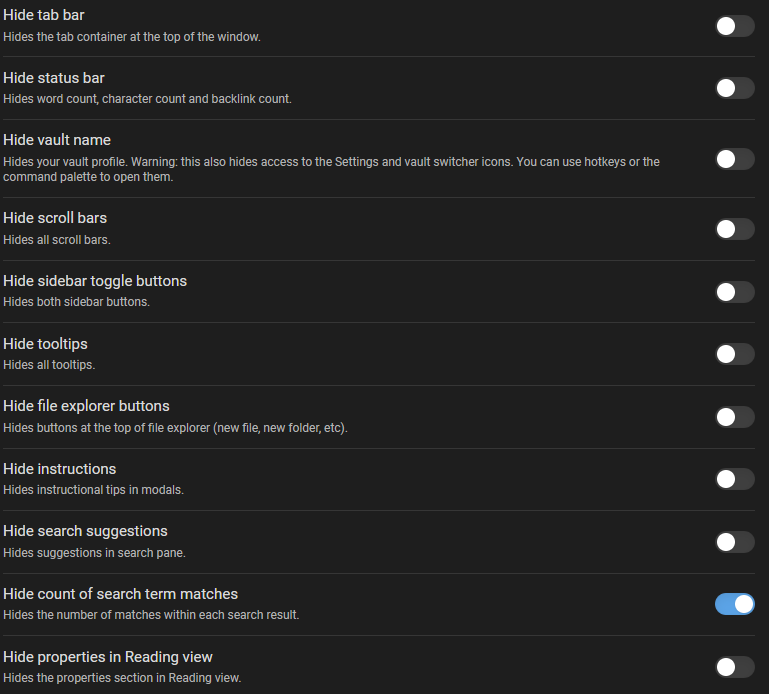
This plugin lets you hide different parts of the user interface of Obsidian.
You can hide the following elements using the settings of this plugin:
Details: Hider plugin for Obsidian
TIP: Did you know that Obsidian has a fullscreen mode?
Fold Properties By Default
This plugin always folds note properties by default. This is useful when your notes include a lot of metadata and/or tags.
Details: Fold Properties By Default plugin for Obsidian
Quiet Outline
This plugin adds a side panel which displays a full outline of the current note. The depth of the outline can be changed on the fly.
Details: Quiet Outline plugin for Obsidian
Insta Toc
Generate, update, and maintain a table of contents for your notes while typing in real time.
Details: Insta Toc plugin for Obsidian
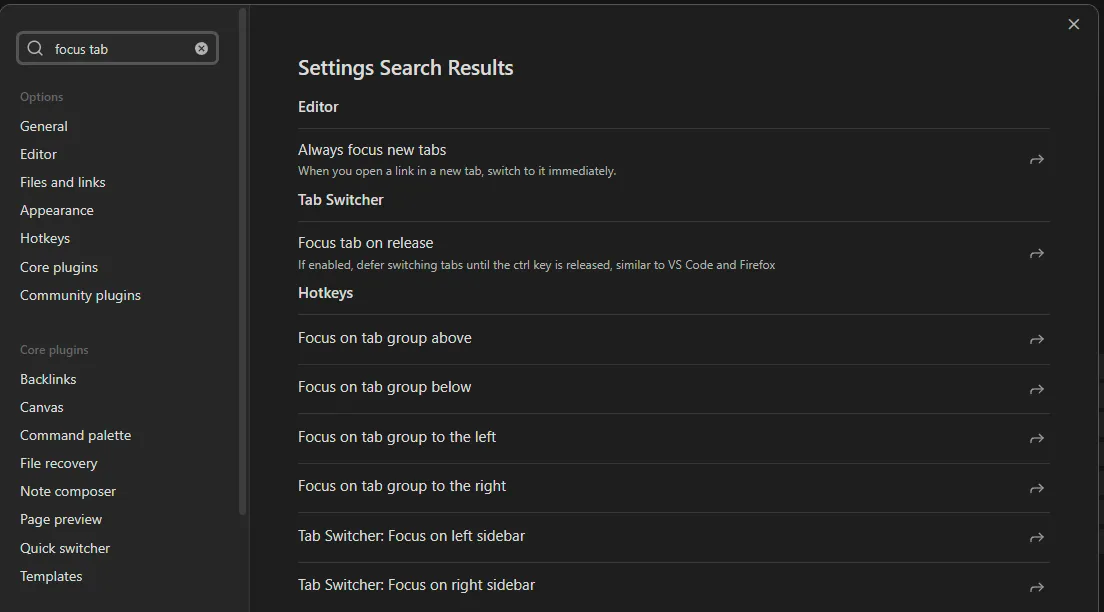
Settings Search
This plugin adds a search box in the top-left corner of the Settings view. Using it, you can quickly find the settings you’re looking for:
Details: Settings search plugin for Obsidian
Banners
Displays image banners on your notes.
Details: Banners plugin for Obsidian
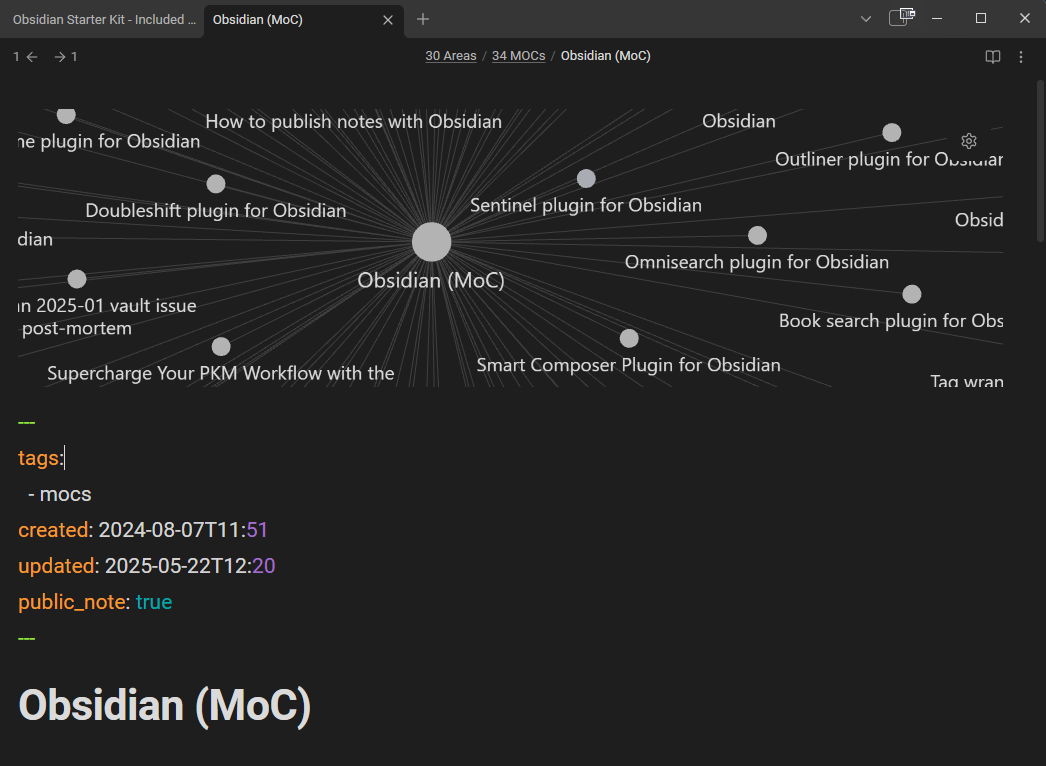
Graph Banner
This plugin displays the local graph right on top of your notes (when in reading or editing mode).
Here's what it looks like:
Details: Graph banner plugin for Obsidian
Iconize
Using this plugin, you can add icons to various elements in Obsidian: folders, tabs, files, titles, etc.
Details: Iconize plugin for Obsidian
Related plugins:
- Emoji toolbar plugin for Obsidian
- Emotion picker plugin for Obsidian
- Icon shortcodes plugin for Obsidian
Backup & Versioning
Local Backup
The Local backup plugin for Obsidian enables automating the creation of local backups of your Obsidian vaults.
Details: Local Backup plugin for Obsidian
Obsidian Git
Backup your Obsidian.md vault with git. A bit technical but really valuable!
Really wonderful when combined with the Local backup plugin for Obsidian, the File recovery core plugin for Obsidian and the Time Machine plugin for Obsidian.
Details: Git plugin for Obsidian
Time Machine
A plugin that makes it a breeze to see (and revert) the changes made between the current version of a note and past versions saved either by the Obsidian File Recovery system or by Git (if your vault is also a Git repository).
It provides a dedicated "Time Machine" view where you can navigate between snapshots of the currently active note, see the differences with the current version, restore previous versions, and also restore specific parts of previous versions.
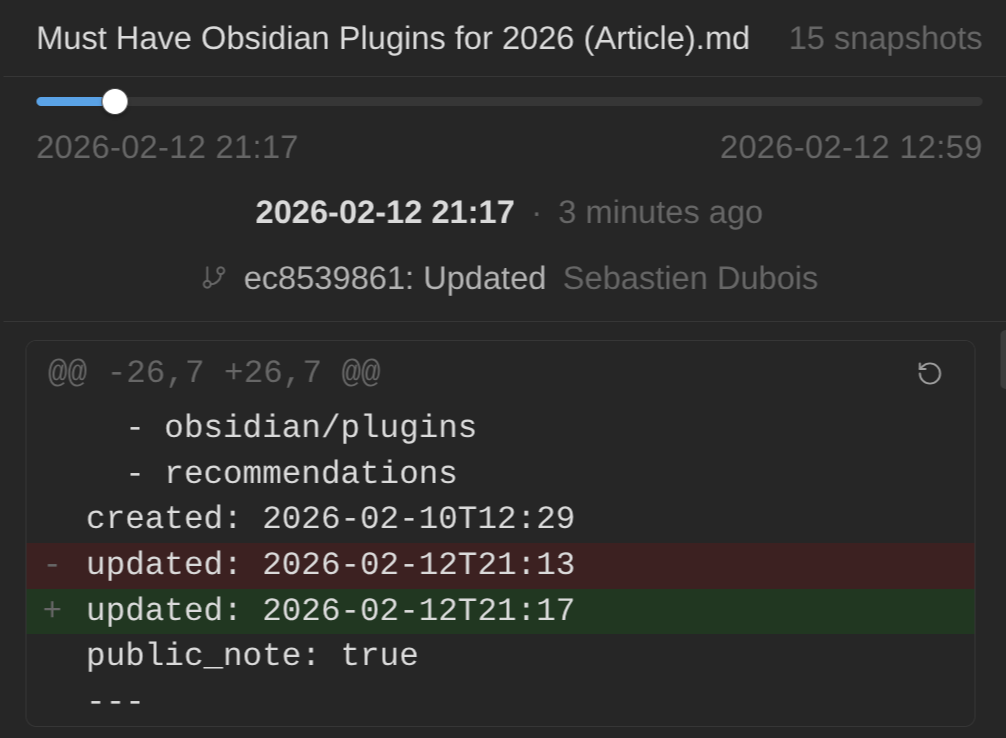
Demo:
Article:
 Sebastien Dubois
Details: Time Machine plugin for Obsidian
Integration & Development
Pandoc
The Pandoc plugin for Obsidian integrates Pandoc with Obsidian. It makes it a breeze to export notes to different markup and file formats.
Details: Pandoc plugin for Obsidian
External Links
This plugin helps users track and manage external links (URLs) within their notes. It displays all external links found on a given note in an organized view, making it easy to see what web resources are referenced. The plugin also provides backlink tracking, showing what other notes link to a given external URL.
Details: External Links plugin for Obsidian
Terminal
This plugin integrates shells, consoles, and terminal emulators directly within Obsidian, enabling users to run command-line interfaces without leaving their note-taking application. It supports both external terminal windows and embedded terminals inside Obsidian, with a built-in developer console accessible across all platforms. The plugin works with popular shells like Bash, PowerShell, and Zsh (Z Shell), as well as terminal emulators including Windows Terminal, iTerm2, and GNOME Terminal.
Details: Terminal plugin for Obsidian
AdvancedURI
The AdvancedURI plugin for Obsidian exposes many features of Obsidian through URIs available locally. This enables interacting with Obsidian from other applications (e.g., scripts) to create notes, move them, invoke commands, apply templates, etc.
Most of what this plugin enables is also supported out of the box by the Obsidian CLI (and then some!).
Details: AdvancedURI plugin for Obsidian
BRAT
The Beta Reviewers Auto-update Tester (BRAT) plugin for Obsidian is used by plugin developers who need beta testers for their plugins. It's a great way to test and explore upcoming plugins.
Be careful though. Beta plugins are not perfect. They get updated regularly, and break quite often.
Details: BRAT plugin for Obsidian
And more... There is an Obsdian plugin for each use case
There are many other really interesting plugins for Obsidian. Here are some you might want to check out as well:
Bonuses
The Obsidian Web Clipper
A last "plugin" I want to mention is the official Obsidian Web Clipper. This one is actually a browser extension, but you don't want to miss it. It makes it a breeze to curate/capture content from anywhere on the Web and to send it all to your Obsidian vault.
The Obsidian Web Clipper not only captures and converts content to Markdown, but also extract useful metadata (e.g., page title, tags, og meta, and more!).
Details: Obsidian Web Clipper
Obsidian CLI
While not technically a plugin, the Obsidian CLI is really worth mentioning. It was released in early 2026 for the insiders, with general availability coming a bit later.
The Obsidian CLI is interesting because it makes it a breeze to:
- Integrate Obsidian with AI
- Control Obsidian from the command-line
- Develop Obsidian plugins (especially when combined with AI)
- ...
Conclusion
In this article, I've listed some of the best Obsidian plugins I know of, and then some. The Obsidian developer community is large and very productive.
The plugin ecosystem of Obsidian adds a ton of value and really deserves your time and attention.
Check those plugins out and tell me which ones you love most. I'm also curious about which plugins you think I should add to this list!
That's it for today! ✨
Feel Overwhelmed?
Don't. As I said at the beginning, you don't actually need all of this. But if you see the value in at least some of those, then take a look at my Obsidian Starter Kit. It comes with batteries included. Carefully curated plugins that come pre-configured into a cohesive whole:
 Knowledge Forge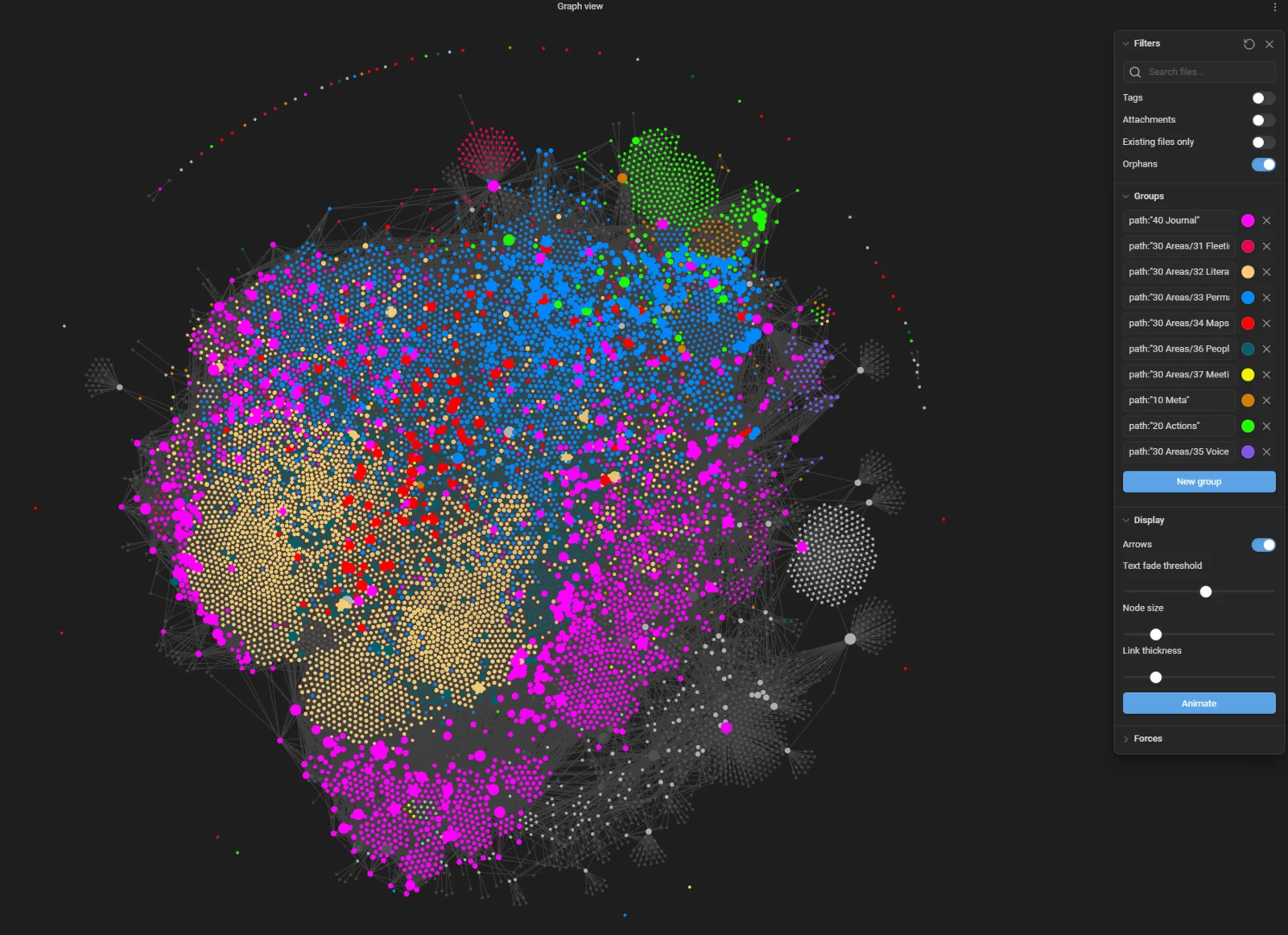
Related
About Sébastien
I'm Sébastien Dubois, and I'm on a mission to help knowledge workers escape information overload. After 20+ years in IT and seeing too many brilliant minds drowning in digital chaos, I've decided to help people build systems that actually work. Through the Knowii Community, my courses, products & services and my Website/Newsletter, I share practical and battle-tested systems.
I write about Knowledge Work, Personal Knowledge Management, Note-taking, Lifelong Learning, Personal Organization, Productivity, and more. I also craft lovely digital products and tools.
If you want to follow my work, then become a member and join our community.
Ready to get to the next level?
Since you're interested in Obsidian:
- 🚀 Obsidian Starter Kit — Skip weeks of setup with 40+ templates
- 🎬 Obsidian Starter Course — Master Obsidian in 2+ hours
- 📚 KM for Beginners — 10+ hours of structured video lessons
- 🎯 Join Knowii — Community + ALL courses & tools
Found this valuable? Share it with someone who needs it.